Instead of reconstructing your meals before every appointment, connect MyFitnessPal to your semaglutide plan through a repeatable food-log review: record intake, summarize symptoms, and share a dated summary through your clinician's approved channel. This 2026 workflow connects nutrition tracking to clinical decisions without assuming an automatic app-to-clinic integration.
- To connect MyFitnessPal to semaglutide plan reviews, share dated food logs and symptoms through your clinician's approved channel.
- MyFitnessPal records food intake; your clinician sets nutrition goals and makes medication decisions.
- GoodLife Health pairs Cardiometabolic Optimization with physician-guided treatment and a Biomarker Audit every 90 days.
- Use complete logging days, accurate portions, and symptom context rather than treating the lowest calorie total as success.
Why this matters
Semaglutide reduces appetite and delays gastric emptying. A smaller appetite does not establish whether you are eating enough protein, drinking enough fluid, or tolerating your treatment well. A food diary helps your clinician ask better questions, but the diary does not answer those questions by itself.
Semaglutide reduces appetite and delays gastric emptying. A smaller appetite does not establish whether you are eating enough protein, drinking enough fluid, or tolerating your treatment well.
GoodLife Health defines Cardiometabolic Optimization as treating metabolic, hormonal, and cardiovascular health as one system. Nutrition records belong beside your symptoms, medication history, activity, and laboratory results, not in a separate weight-loss scorecard.
GoodLife Health's Cardiometabolic Optimization membership is best for adults seeking physician-guided weight, hormone, and cardiovascular care together. Its limitation in this workflow is clear: a food log remains information for clinical review, not a substitute for assessment or evidence of an automatic MyFitnessPal connection.
The useful outcome is a specific conversation. Your clinician should be able to distinguish an incomplete diary from low intake, recognize a pattern of symptoms, and decide whether your nutrition or treatment plan needs attention.
Before you start
- Have your accounts and treatment details ready. You need access to your MyFitnessPal account, your current written prescription instructions, and the communication channel your clinical team approves for sending health information. Keep your medication name and recent changes available separately from the food diary.
- Agree on nutrition goals and a review method. Ask your clinician what to track, how often to share it, and whether a registered dietitian should help set targets. Confirm the preferred format before collecting screenshots or changing diary-sharing permissions.
- Resolve the non-obvious gotcha: an app connection is not clinical delivery. Syncing information to another app does not establish that your prescriber receives or reviews it. Menu placement also differs across MyFitnessPal versions; the core labels used below are Diary, Add Food, and Nutrition, rather than a promised identical screen layout.
For this 2026 setup, use a suggested observation window of 7 days and 1 summary per week, unless your clinician requests something different. These are workflow choices, not medical requirements or promises of monitoring. Do not wait for a scheduled summary when symptoms need prompt care.
Food diary configuration
Establish the goals before entering meals
- Ask your clinician to define the purpose of tracking. Identify whether the immediate concern is meal consistency, protein intake, hydration, food tolerance, or another documented issue.
- Record any clinician-approved targets with their units. Keep grams distinct from percentages and distinguish daily targets from per-meal guidance.
- Review the goals currently displayed in MyFitnessPal. Do not assume an automatically generated calorie or weight-loss target is appropriate during semaglutide treatment.
- Keep prescription instructions outside the nutrition target settings. Do not interpret an app's remaining-calorie display as permission to change your medication.
Expected result: You know what the diary is supposed to measure and which targets came from your clinical team. You have not converted a general-purpose app suggestion into a medical instruction.
There is no universal semaglutide calorie target. Appropriate intake depends on your clinical circumstances, including body size, activity, kidney function, other conditions, and treatment tolerance. Ask for an individualized plan rather than copying another person's numbers.
For adults using GoodLife Health's medical weight loss care, licensed physicians of Beluga Health, P.A., deliver clinical care under GoodLife Health's clinical protocols. Beluga Health, P.A., is an independent Florida professional corporation licensed to practice in all 50 states; the food diary supports that clinical relationship rather than replacing it.
Enter meals you actually eat
- Open Diary and select the correct date. Check the date before entering a late meal or correcting yesterday's record.
- Select Add Food under the relevant meal. Find the food entry, then compare its serving description with what you consumed.
- Adjust the serving amount before saving. Record the portion eaten, not the portion originally served or the amount you hoped to finish.
- Return to Diary and check that the entry appears under the intended meal and date. Correct accidental duplicates immediately.
Expected result: Your diary represents food consumed on a specific day. Planned meals, unfinished portions, and duplicate entries are not inflating the record.
Include cooking oils, sauces, drinks, and snacks when they contribute to the intake you are tracking. For packaged foods, compare the diary entry with the package label rather than assuming a similar name means identical nutrition.
Be consistent with preparation state. A cooked-food entry and a raw-food entry do not describe the same portion by weight. If you cannot identify an exact match, mark the entry as an estimate in your review summary rather than presenting it as a precise measurement.
Check completeness before interpreting totals
- Review Diary for missing meals and beverages. Ask whether a blank meal means you ate nothing or simply forgot to log it.
- Open Nutrition to review the available nutrient totals. Compare those totals with your clinician-approved goals, not with someone else's screenshots.
- Identify incomplete days in your separate summary. Do not average an unfinished day together with complete days without telling your clinician.
- Correct obvious portion errors before sharing. Preserve uncertainty when you cannot reconstruct a meal reliably.
Expected result: Your clinician can distinguish an actual intake pattern from a logging problem. A low total is not automatically interpreted as successful restriction or inadequate nutrition.
This distinction matters throughout the 2026 workflow. Food databases and self-reported portions are not laboratory measurements. Consistent entries with clearly identified gaps are more useful than apparently exact totals built from mismatched foods.


Symptom record configuration
Pair food records with treatment context
- Create a separate dated symptom record in a place you can share securely. Do not rely on finding a medication-specific feature inside MyFitnessPal.
- Record your medication name and administration date according to your written prescription. Add any recent clinician-directed change without independently changing the schedule.
- Describe symptoms in plain language. Include nausea, vomiting, constipation, diarrhea, early fullness, dizziness, or difficulty drinking when they occur.
- Note the timing relative to meals and medication administration. Record what happened without declaring that a particular food or dose caused it.
Expected result: Your food diary has clinical context. Your clinician can compare intake with symptoms without treating a temporal association as a proven cause.
Use a repeatable sequence: Food record, Symptom record, Weekly summary, and Clinical review. The patient records observations; the clinician interprets them and decides what needs further evaluation.
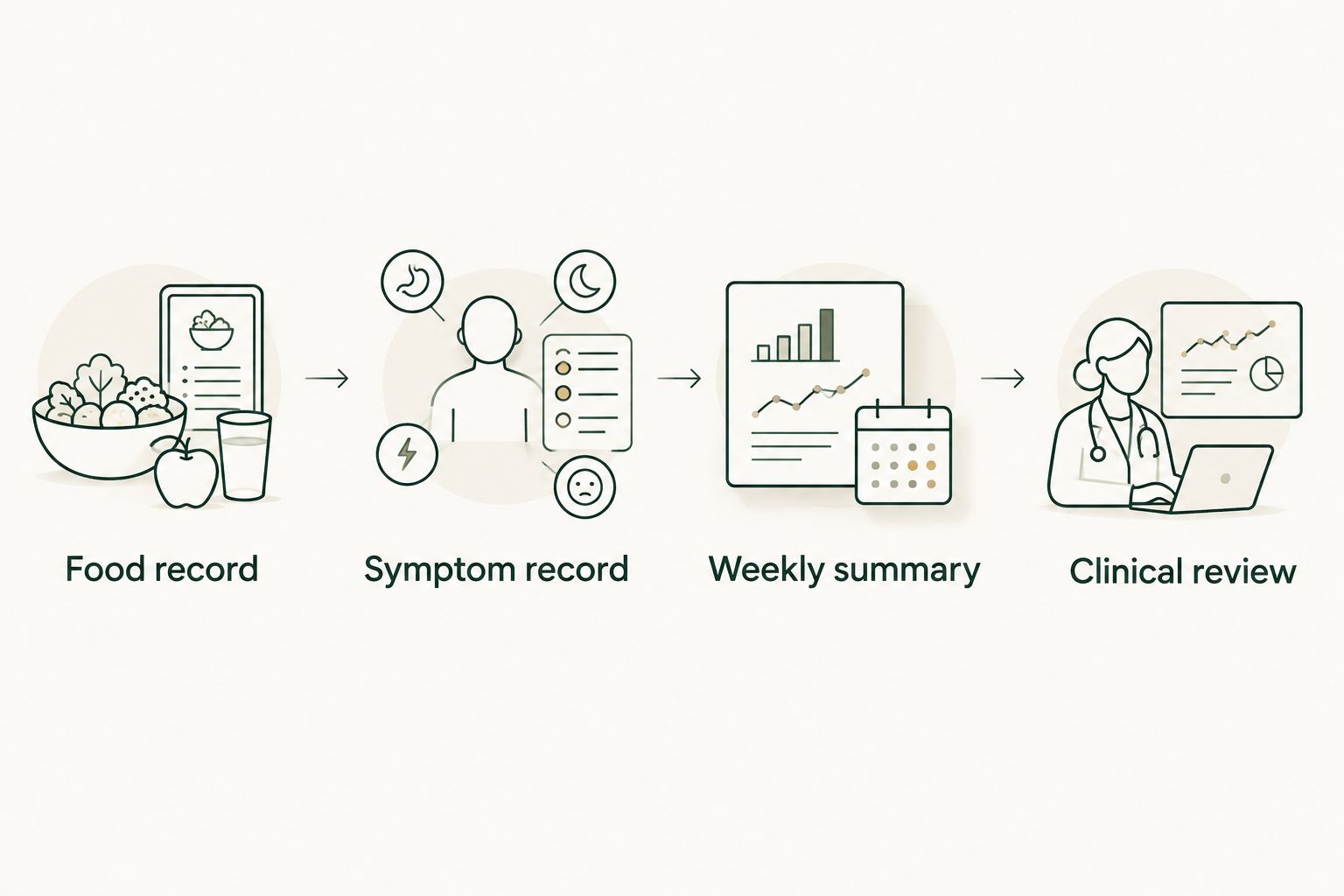
Recording food is the starting point; clinical interpretation is a separate step.
A useful symptom note describes what changed and what you could tolerate. For example, document whether early fullness prevented you from finishing meals, rather than writing only that appetite was low. Do not manufacture a precise symptom score if you did not record one at the time.
A symptom diary is not an emergency monitoring service. Severe or persistent abdominal pain, repeated vomiting, inability to keep fluids down, fainting, or signs of a serious allergic reaction require prompt medical assessment. Seek emergency care for severe symptoms; do not wait for an app response or diary review.
Track hydration without imposing a universal target
- Ask your clinician whether fluid tracking belongs in your plan and whether you have a fluid restriction.
- Record drinks consistently using a single unit, such as milliliters or fluid ounces. Distinguish the amount consumed from the container's full capacity.
- Note vomiting, diarrhea, or difficulty drinking alongside the fluid record. A beverage total alone does not establish adequate hydration.
- Follow your clinician's instructions for symptoms or reduced intake. Do not add supplements or large amounts of fluid solely to satisfy an app goal.
Expected result: Hydration information is interpretable and consistent with your medical history. You have not adopted a generic drinking target that conflicts with kidney, heart, or other care instructions.
Clinician handoff configuration
Choose a sharing format that your clinician accepts
There are several ways to prepare a food record for review. None establishes an automatic connection to a prescribing service, and none guarantees that the recipient monitors incoming information continuously. Confirm the handoff method first.
Sharing formats for clinician handoff
| Sharing method | Best for | Advantage | Limitation |
|---|---|---|---|
| Dated diary screenshots | Showing specific meals and portions | Preserves the visible food entries | Requires manual capture and a separate symptom summary |
| Written weekly summary | Preparing focused questions for an appointment | Keeps the review concise and identifies incomplete days | Requires careful transcription and can omit meal detail |
| Summary with selected screenshots | Explaining a specific intake or tolerance concern | Combines context with supporting food entries | Takes more preparation and still requires clinician review |
Use a written summary with selected screenshots when your clinician accepts that format. It keeps the question visible without requiring the recipient to reconstruct an entire week from images. Screenshots alone are better suited to a narrow question about a particular day.
Avoid sending account passwords or broad device access. If your team requests a diary-sharing feature, confirm who can view the information and whether a separate notification is required. Access to a diary is not confirmation that anyone has opened it.
Prepare and send the review packet
- Write the date range and state how many days are complete. Identify missing meals rather than silently treating them as zero intake.
- Summarize the clinician-requested nutrition measures. Include units and distinguish observed intake from the targets you were trying to meet.
- Add medication timing and the symptom pattern. Keep the description factual and include any barriers to eating or drinking.
- Attach only the diary views relevant to the question. Check that dates and portions are readable and unrelated personal information is excluded.
- Send everything through the clinical team's approved channel. Ask whether the team needs an appointment to interpret the record and discuss changes.
Expected result: Your clinician receives a dated, understandable question with supporting records. You know the difference between sending information, confirming receipt, and receiving a clinical assessment.
A reusable summary template keeps this manageable:
- Review period: Start date and end date, including 2026 when applicable.
- Record completeness: Complete days, partial days, and known omissions.
- Nutrition pattern: Requested measures, units, and recurring difficulty meeting the agreed plan.
- Treatment context: Medication name, administration dates, and recent prescribed changes.
- Symptoms and function: Food tolerance, drinking difficulties, bowel changes, and changes in everyday strength or activity.
- Question for review: The decision or concern you want the clinician to address.
For the broader care process, see direct primary care for weight loss management. Food records help inform treatment; they do not independently determine eligibility, prescription selection, or dose escalation.
Second workflow: review nutrition whenever treatment changes
A weekly review is useful for an ongoing pattern. An event-based review answers a different question: what changed after a clinician-directed treatment adjustment, a new symptom, or a disruption to your usual meals?
- Mark the change date in your separate record. Include the year so a saved 2026 summary cannot be confused with an older record.
- Continue logging with the same serving conventions. Changing both the treatment and your measurement method makes comparison harder.
- Describe the before-and-after pattern without assuming causation. Note appetite, meal completion, fluid tolerance, bowel symptoms, and daily function.
- Contact your clinical team according to the instructions already provided. Ask whether the symptom pattern changes the nutrition plan or warrants assessment.
- Record the clinician's advice separately from your observations. Follow the written prescription rather than an inference drawn from app totals.
Expected result: The clinical team can review a defined change against a consistent record. You avoid the common mistake of changing food targets, medication timing, and logging methods simultaneously.
Do not automatically reduce your calorie goal because appetite falls after an adjustment. Low intake and weight loss are different observations. Likewise, a short weight plateau does not establish that a higher dose is appropriate.
The same event-based workflow applies during maintenance. If your clinician changes the nutrition plan, record when the new targets began so later summaries do not compare intake against the wrong goal.
Troubleshooting
The diary shows a low total, but the record is unfinished
Complete the missing entries if you can recall them reliably. Otherwise, label the day incomplete and explain what is missing. Do not backfill meals with invented portions just to produce a complete-looking weekly average.
Fix: Separate missing information from confirmed low intake before asking for interpretation.
Protein or calories look wrong for a familiar meal
Check the selected food, preparation state, serving size, and number of servings. Compare packaged entries with the label and look for accidental duplicates. Correct the underlying entries before changing your nutrition targets.
Fix: Repair the food record first; do not compensate for a database mismatch by restricting another meal.
Your clinician cannot open the diary information
Ask whether the issue is the file format, access permissions, unreadable images, or an unsupported handoff method. Resend only through the approved channel and provide a short written summary if requested. Never solve an access problem by making health information broadly public.
Fix: Use the format the recipient confirms they can review, not the most technically elaborate connection.
Low appetite makes the app target difficult to meet
Record what you actually ate and describe the barrier. Do not force large meals through nausea or treat a missed target as a reason to skip future meals. Persistent difficulty eating or drinking needs clinical advice.
Fix: Ask your clinician or registered dietitian to reassess food choices, portions, and treatment tolerance rather than lowering targets independently.
Tracking increases anxiety or compulsive restriction
Tell your clinician that the tracking method itself is causing difficulty. A calorie-focused diary is not appropriate for every person, particularly when it aggravates disordered eating. Ask about a simpler meal-pattern record or dietitian-supported approach.
Fix: Change the monitoring method with your care team; the app is optional, adequate care is not.
Customize your workflow
Expand the record only when the additional information answers a clinical question. Resistance-training participation, changes in strength, sleep disruption, and food aversions can provide context. Adding every available metric makes the handoff harder to interpret without necessarily improving the decision.
GoodLife Health includes a comprehensive Biomarker Audit every 90 days, or 4 audits per year, within its Cardiometabolic Optimization membership. The panel includes ApoB, Lp(a), hs-CRP, HbA1c, lipids, insulin markers, and full hormone and thyroid panels. Laboratories run through the Beluga Health lab network.
Food records and laboratory results answer different questions. A diary describes reported behavior and intake; laboratory testing measures biological markers. Neither a completed diary nor a falling scale number proves that blood sugar, lipids, inflammation, or hormone status has normalized.
For your next 2026 review, choose one unresolved question and build the packet around it. Ask whether intake supports your clinical plan, whether symptoms require assessment, or whether your nutrition goals need revision. Do not turn a more detailed diary into an automatic medication-adjustment system.
FAQ
How do I connect MyFitnessPal to my semaglutide plan?
Connect MyFitnessPal to your semaglutide plan by recording meals, adding a separate symptom record, and sending a dated summary through your clinician's approved channel. This workflow does not require or establish a native app-to-clinic integration.
Does sharing my MyFitnessPal diary mean my doctor is monitoring it?
Sharing your MyFitnessPal diary does not establish that your doctor is monitoring it. Confirm how to notify the clinical team, what they will review, and when to seek care instead of waiting for a response.
What calorie goal should I use while taking semaglutide?
Use a calorie goal individualized by your clinician or registered dietitian. MyFitnessPal's automatically generated goal is not a semaglutide prescription or confirmation that the target fits your medical history.
Should I track protein while taking semaglutide?
Track protein when your clinical team includes it in your nutrition plan. Ask for an individualized target and review it alongside total intake, activity, symptoms, and relevant medical conditions.
Can MyFitnessPal tell me when to increase my semaglutide dose?
MyFitnessPal cannot determine when you should increase your semaglutide dose. Your prescriber makes treatment decisions using your clinical history, response, tolerance, and written treatment plan.
What should I do if I cannot eat enough because of nausea?
Contact your clinical team when nausea persistently interferes with eating or drinking. Repeated vomiting, inability to keep fluids down, or severe or persistent abdominal pain requires prompt medical assessment rather than waiting for a routine diary review.
References
- Tirzepatide Once Weekly for the Treatment of Obesity (SURMOUNT-1). 2022. pubmed.ncbi.nlm.nih.gov/35658024/
- Once-Weekly Semaglutide in Adults with Overweight or Obesity (STEP 1). 2021. pubmed.ncbi.nlm.nih.gov/33567185/