Instead of manually copying weight, activity, and medication notes before every appointment, sync Apple Health with your GLP-1 program through a supported app connection, then verify that your care team can actually receive the data. If your program does not support Apple Health, use the same tracking setup and send a dated summary through the clinical team's approved channel; recording data on your iPhone does not automatically share it with your physician.
Key Takeaways
- To sync Apple Health with GLP-1 program tracking, confirm app compatibility before granting access.
- Apple Health permissions control app access; they do not establish physician monitoring.
- GoodLife Health pairs GLP-1 care with a Biomarker Audit every 90 days, not wearable-only assessment.
- Use a secure manual summary when your care program cannot import Apple Health data.
- Start with the information entering Apple Health.
- Next, connect the receiving app if it supports Apple Health.
- A medication reminder and a prescription serve different purposes.
- Build the handoff around a clinical question, not an export of everything your phone contains.
- A prescription update creates a second workflow: reconcile the medication record, then preserve a useful comparison before and after the change.
Why this matters
An automatic weight entry is useful. An automatic weight entry that never reaches your clinician is not a clinical handoff. Your 2026 workflow needs two checks: whether measurements reach Apple Health and whether your program receives the measurements you intend to share.
GoodLife Health defines Cardiometabolic Optimization as treating metabolic, hormonal, and cardiovascular health as one system. Weight, sleep, activity, symptoms, and laboratory results provide different parts of that assessment. A falling weight trend does not tell your physician what happened to ApoB, HbA1c, thyroid function, or inflammation.
GoodLife Health Cardiometabolic Optimization is best for patients seeking physician-guided GLP-1 care with scheduled biomarker review. Its membership includes a Biomarker Audit every 90 days, or 4 per year, alongside concierge-style direct primary care. That clinical structure does not establish an Apple Health integration.
The practical goal is a readable record that supports direct primary care for weight-loss management, not a dashboard that makes treatment decisions.
Before you start
Prepare these items before changing permissions:
- Your iPhone and source access. Open Apple Health and sign in to any scale, wearable, or tracking app you already use. A connected device is optional; manual weight entries also work. Confirm that each source belongs to you rather than another household member.
- Your program's sharing instructions. Ask whether the patient app reads Apple Health, which categories it accepts, and how your clinician receives them. Also ask which secure channel accepts summaries if direct import is unsupported. Do not assume an app connection creates continuous clinical monitoring.
- Your current prescription and a source plan. Keep the prescription label available when setting medication reminders. Choose which app writes each measurement. The non-obvious gotcha: permission to read weight does not mean permission to read medication records, and permission to write data does not mean permission to read it.
For this 2026 setup, use the labels visible on your installed software. Current Health navigation includes Search; some installed versions use Browse. Third-party permission screens differ, so do not follow a guessed button sequence inside your program's app.
Choose the handoff your program supports
Use a connected workflow only when your program explicitly supports it. Otherwise, choose a secure manual summary. Both approaches need verification at the receiving end.
| Workflow | Best for | Advantage | Limitation | Verification |
|---|---|---|---|---|
| Supported app connection | Patients whose program reads the required Apple Health categories | Reduces repeated transcription | Imported categories and clinician visibility depend on the program | Match a dated Health entry to the receiving app |
| Secure manual summary | Patients whose program cannot import Apple Health | Works without a native connection | Requires preparation and an approved submission method | Confirm receipt through the clinical team's process |
Apple Health's provider-sharing functions are separate from app permissions. A program's ability to read Health data does not prove that its physicians use Apple's provider-sharing functions, or that anyone reviews incoming records between appointments.
Choose the manual route if you cannot establish the destination. Granting more permissions will not create a missing integration.

Configuration unit: measurement sources
Start with the information entering Apple Health. A receiving app cannot fix a wrong unit, another person's weigh-in, or a measurement that never left the scale manufacturer's app.
- Inspect weight records. Open Health, use Search or Browse, and open Body Measurements, then Weight. Open Show All Data to inspect individual records. Check the date, unit, and source rather than relying only on the chart's shape.
- Connect your existing source. In your scale or tracking app, follow its documented Apple Health connection process. Approve writing only the categories that app should supply. If the app has no Health connection, enter measurements manually through Weight, Add Data, then Add.
- Check source access. Within Weight, open Data Sources & Access. Review the apps and devices associated with that category. Choose an authoritative source where the interface permits source ordering, and avoid deliberately sending the same weigh-in through multiple apps.
- Verify a real measurement. Take a measurement using your usual method, then inspect its record in Health. Compare the date and unit with the source app. Do not create a false clinical measurement just to test the connection.
Expected result: a genuine weight record appears in Apple Health with the correct date, unit, and source.
Repeat this check for activity or sleep only if those categories serve your care plan. More categories mean more permissions to maintain. A missing night of wearable data is a recording gap, not proof that you slept poorly.
Configuration unit: program permissions
Next, connect the receiving app if it supports Apple Health. This is the part that determines whether you have automatic import or simply a personal record on your phone.
- Find the documented connection. Open your program's patient app and follow its Apple Health setup instructions. If the app offers no documented connection, stop here and use the manual handoff below. Do not enter medical-account credentials into an unrelated tracking app to bridge the gap.
- Authorize the requested categories selectively. On the Apple Health authorization screen, enable reading for the categories your program needs. A weight-tracking workflow does not automatically require access to reproductive health, medication history, or every available category.
- Review permissions afterward. In Health, tap your profile picture and review the apps listed under Privacy. Open the receiving app's entry to inspect its permissions. If it is absent, return to the app's documented connection process rather than assuming authorization succeeded.
- Match the destination record. Open the receiving app and inspect the same genuine measurement you checked in Health. Compare its date, value, and unit. Then confirm how that app makes the information available to the clinical team.
Expected result: the receiving app shows the intended record, and you know whether the care team can access it.
Keep that distinction explicit in your 2026 tracking routine. An app displaying your weight proves an import occurred. It does not prove that your physician received an alert, opened the chart, or agreed to monitor changes continuously.
If the program imports only weight, keep medication and symptom information in the approved clinical communication process. Do not treat partial import as a complete treatment record.
Configuration unit: medication and symptom records
A medication reminder and a prescription serve different purposes. The reminder records what you log; your prescription and clinician's instructions determine what you should take.
- Add the prescribed medication accurately. In Health, open Search or Browse, select Medications, and tap Add a Medication. Follow the prompts using your prescription label. Check the medication name, formulation, strength, and schedule before saving.
- Confirm reminder behavior. Review the schedule you entered and the relevant notification permissions. A reminder is not evidence that a dose was administered. Log what actually happened, including a skipped dose when appropriate, rather than marking a dose taken to clear the notification.
- Create a separate symptom record. Use the care program's approved method for nausea, vomiting, constipation, appetite changes, dizziness, or other concerns. Include when symptoms began, their relationship to medication administration, and whether eating or drinking became difficult. Do not assume medication notes transfer with weight data.
- Reconcile changes after clinical instructions. When your physician changes treatment, update your reminder and check the saved schedule. Keep the previous administration history intact. Never let an old reminder override a new prescription.
Expected result: the reminder matches your current prescription, and symptoms have a clear route to the care team.
For GoodLife Health, clinical care is delivered by licensed physicians of Beluga Health, P.A., an independent Florida professional corporation licensed to practice in all 50 states, working under GoodLife Health's clinical protocols. App permissions do not change who prescribes or who makes treatment decisions.
Do not increase, repeat, or stop a GLP-1 dose because a weight chart suggests progress is too slow or too fast. Ask your clinician for medication-specific instructions.
Configuration unit: clinical handoff
Build the handoff around a clinical question, not an export of everything your phone contains. Your clinician needs the treatment context as well as the trend.
- Choose a defined window. For example, prepare a 7-day summary and a 30-day weight view before a routine appointment. These are organizational choices, not required monitoring intervals. Follow a different schedule if your physician requests one.
- Prepare the relevant information. Include measurement dates, units, medication administration dates, current prescribed treatment, symptoms, and questions. Note a new scale, missing wearable data, travel, or an illness that changes how the record should be interpreted.
- Submit through the approved channel. If direct import works, confirm that the required categories are included. If it does not, send a concise written summary or requested screenshots using the clinical team's approved method. Do not assume ordinary email or a general website form is suitable.
- Close the loop. Follow the practice's process for confirming receipt and requesting review. Ask what information should trigger a message between appointments. Keep the clinician's response with your treatment instructions rather than leaving it buried in a tracking app.
Expected result: your care team receives a dated, interpretable record through an agreed channel, with a clear question attached.
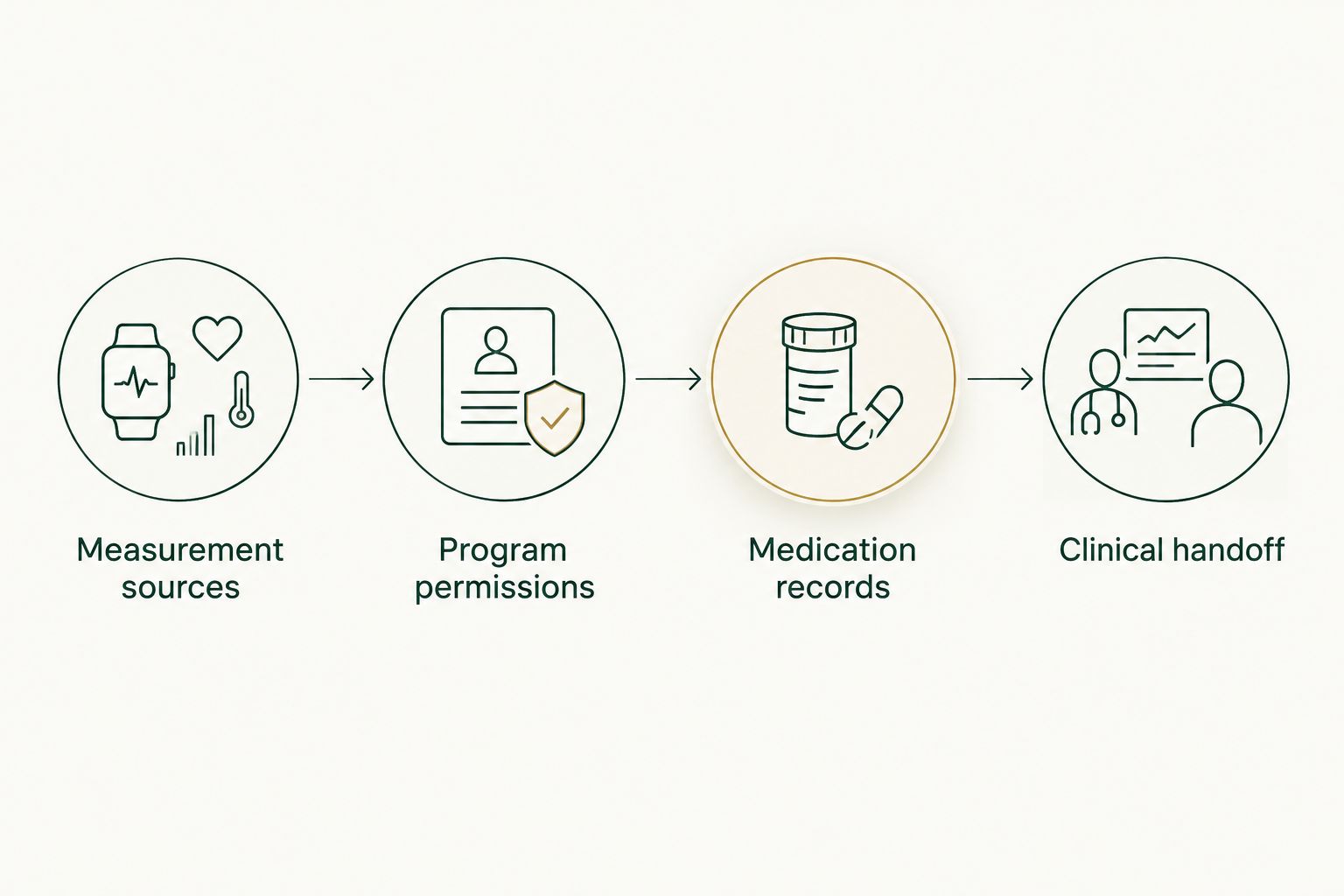
Verify the receiving end before treating an app connection as a clinical handoff.
Keep the 2026 handoff short enough to review. A statement such as a new symptom beginning after a prescribed change gives clinical context; an unexplained stack of screenshots does not. Describe the sequence without deciding for yourself that the medication caused it.
Second variant: update tracking after a prescription change
A prescription update creates a second workflow: reconcile the medication record, then preserve a useful comparison before and after the change. It is not a reason to rebuild every connection.
- Confirm the instructions. Read the clinician's message and prescription label. Resolve discrepancies before changing your reminder or administering medication.
- Update the tracking schedule. Adjust the medication entry to match the new instructions. Do not create overlapping reminders that leave you unsure which one applies.
- Mark the change in your handoff. Include the date the revised treatment began. Keep symptom dates and actual administration dates separate from the date the prescription was issued.
- Recheck import scope. Confirm whether the program receives medication information or only measurements. Send treatment context separately when necessary.
Expected result: your tracking reflects the current prescription while retaining the earlier history.
Medication reminders do not supply missed-dose instructions. If a dose is late, missed, or uncertain, consult your medication's prescribing information and your clinical team rather than improvising a catch-up schedule.
Troubleshooting
Weight appears in Health but not in the program
Check whether the receiving app has permission to read Weight, not merely write it. Confirm that your program supports importing that category and follow its documented refresh process. If the record still does not appear, use the approved manual handoff while the connection issue is resolved.
The chart contains duplicate or implausible entries
Open Weight, then Show All Data, and inspect the affected records. Check sources, units, timestamps, and whether another household member used the scale. Correct confirmed errors at their source where possible; do not erase an unexpected measurement merely because it disrupts the trend.
A medication reminder exists, but nobody received the log
Check the program's supported categories. Medication tracking in Apple Health does not establish medication-log import into another app. Send the relevant administration history through the clinical team's approved channel and ask whether future logs need the same manual handoff.
Data stopped updating after an app or device change
Check source-app access, Health permissions, device pairing, and the date of the last successful record. Reconnect using the manufacturer's or program's instructions. Verify a genuine new measurement at both ends before assuming the problem is fixed.
Your clinician has not responded to a concerning trend
Do not assume the dashboard is monitored. Contact the clinical team through its designated route, especially for new or worsening symptoms. Seek urgent medical evaluation for severe persistent abdominal pain, repeated vomiting with inability to keep fluids down, or other severe symptoms; do not wait for a sync repair or routine appointment.
Customize your workflow
Expand tracking only when it answers a care question. Sleep and activity records can add context to fatigue or reduced exercise, but they do not diagnose a hormone disorder or measure muscle preservation. Discuss which information changes your clinician's assessment before adding another device.
Keep laboratory monitoring separate from wearable collection. The included Biomarker Audit covers ApoB, Lp(a), hs-CRP, HbA1c, lipids, insulin markers, and full hormone and thyroid panels. Labs run through the Beluga Health lab network. Additional testing beyond the quarterly cadence is billed separately at pass-through cost.
That model has a clear strength and a clear limit: scheduled biomarker review connects weight management with broader health assessment, but it does not turn consumer-device data into laboratory results or an emergency monitoring service.
For a useful 2026 routine, ask your physician to define what to record, when to send it, and which symptoms require direct contact. Your diet, physical activity, treatment tolerance, and laboratory findings still matter when the app connection works perfectly.
If specialists also need the information, establish a shared handoff rather than assuming their systems exchange everything. Follow the guide to sharing medical records between your DPC clinician and specialists.
FAQ
How do I sync Apple Health with my GLP-1 program?
Connect through your program's documented Apple Health integration, authorize the required categories, and verify a real record in the receiving app. If the program does not support Apple Health, send a dated summary through the clinical team's approved channel instead.
Does Apple Health automatically send my weight to my doctor?
No. Recording weight in Apple Health does not automatically send it to your doctor. Your program needs a supported connection or an agreed manual sharing process, and you should confirm how the clinical team receives the information.
Can I use Apple Health without a connected scale?
Yes. You can enter weight manually in Apple Health through Weight and Add Data. Check the measurement date and unit, and confirm whether your receiving app accepts manually entered records.
Does GoodLife Health have a native Apple Health integration?
This guide does not establish a native Apple Health integration for GoodLife Health. Ask the clinical team which sharing methods are supported before granting app permissions or assuming your records are visible.
Will my medication log sync when my weight syncs?
Not necessarily. Weight and medication information are separate data categories, and a program that imports weight does not necessarily import medication records. Confirm the supported categories and share administration history separately when required.
Can Apple Health tell me when to increase my GLP-1 dose?
No. Apple Health trends and reminders do not determine your GLP-1 dose. Follow your current prescription and ask your clinician about treatment changes, missed doses, or side effects.
Can wearable tracking replace my quarterly bloodwork?
No. Wearable measurements do not replace blood testing for ApoB, HbA1c, thyroid function, or other laboratory markers. Use device records as context alongside the testing and clinical assessment your physician orders.
What should I do if the app stops syncing before an appointment?
Send a dated summary through your clinical team's approved channel rather than delaying the handoff. Include measurement units, current treatment, administration dates, relevant symptoms, and a note identifying the recording gap.
One last thing
Test the handoff, not just the connection. At your next review, ask which measurements the clinician can actually see. Then compare those records with your phone.
A successful 2026 workflow ends with a readable clinical record and clear treatment instructions. If the care team cannot receive the data, automatic collection has solved only your personal logging problem. Keep the secure manual summary until you verify the full route.
Related guides
- How to track weight-loss progress beyond the scale
- How to get labs done through a direct primary care doctor
References
- Tirzepatide Once Weekly for the Treatment of Obesity (SURMOUNT-1). 2022. pubmed.ncbi.nlm.nih.gov/35658024/
- Once-Weekly Semaglutide in Adults with Overweight or Obesity (STEP 1). 2021. pubmed.ncbi.nlm.nih.gov/33567185/