Instead of manually copying every glucose reading into a food diary, connect Dexcom CGM to your weight loss plan through a shared reporting routine: keep glucose data in Dexcom Clarity, record meals and weight separately, and review matching dates with your clinician. This 2026 workflow connects the information without assuming your weight loss app supports a direct Dexcom integration.
- To connect Dexcom CGM to weight loss plan records, match Dexcom Clarity reports with dated meals, activity, and weight.
- Dexcom measures glucose, not fat loss; a flatter glucose curve does not prove your weight loss plan works.
- GoodLife Health Cardiometabolic Optimization combines physician-guided weight care with hormonal and cardiovascular assessment.
- Use clinician-approved glucose targets, protect account access, and never automate medication changes from sensor readings.
Why this matters
A glucose graph explains part of your response to food, activity, illness, and medication. It does not measure calorie intake, muscle preservation, thyroid function, or cardiovascular risk. Treating every upward movement as a dietary failure turns useful monitoring into unnecessary restriction.
GoodLife Health defines Cardiometabolic Optimization as treating metabolic, hormonal, and cardiovascular health as one system. CGM belongs inside that assessment, not above it. Your clinician still needs your medical history, symptoms, weight trend, and appropriate laboratory testing.
GoodLife Health Cardiometabolic Optimization is best for adults seeking physician-guided weight care alongside hormone and cardiovascular assessment. Its limitation for this workflow is specific: this guide does not establish a native Dexcom connection, automatic chart import, or CGM coverage through membership.
The practical goal is a reviewable record, not another dashboard. When a recurring glucose pattern lines up with your meals, sleep, or medication history, your clinician has a better question to investigate.
Before you start
- Confirm your device and clinical purpose. Have your Dexcom account, the manufacturer-supported app for your exact sensor, a compatible phone or receiver, and access to Dexcom Clarity where supported. Ask your clinician whether CGM is useful for your situation; it is not required for everyone pursuing weight loss.
- Prepare a second record. Use a food diary, spreadsheet, or weight-tracking app that lets you retrieve dated entries. Have a scale and your current medication list. Get the clinical team's approved method for sending reports before collecting sensitive information in another service.
- Check the non-obvious gotcha: device names are not interchangeable. This guide uses the Dexcom G7 and Dexcom Clarity reporting route, not a universal connector for every Dexcom-branded product. In 2026, confirm your exact sensor, country, account region, and app support before following another device's setup instructions. Clarity is for retrospective review, not a replacement for real-time alerts.
Dexcom's G7 User Guide and Clarity User Guide are the manufacturer references for device operation and reporting. For your 2026 setup, use the current versions for your device and region. Phone compatibility, alert behavior, and report access must match those instructions.
Glucose data connection
The first configuration unit connects your sensor record to a reporting account. It does not connect your sensor directly to a weight loss prescription or prove that a clinic receives the data.
- Identify the exact sensor. Check the product name on your packaging and in its supported app. Follow that product's pairing, insertion, warm-up, and safety instructions rather than adapting instructions from a different model.
- Verify active readings. Confirm that the supported Dexcom app or receiver displays current sensor information. Resolve pairing or sensor errors before setting up retrospective reports. Do not use missing data as evidence that glucose stayed stable.
- Open Dexcom Clarity. Sign in through the supported Clarity app or web interface using the appropriate Dexcom account. If you use a receiver rather than a connected phone, follow the manufacturer instructions for uploading receiver data.
- Check the reporting period. In the Clarity web interface, open Overview and inspect the dates shown. Confirm that the record belongs to you and includes the period you intend to review.
- Confirm the receiving route. Ask whether your clinical team accepts Clarity clinic sharing, downloaded reports, or another approved transfer method. Use a clinic invitation only when the clinic provides it. Never give anyone your account password as a substitute for sharing authorization.
Expected result: your sensor record appears in your own Clarity account for identifiable dates, and you know how the clinical team wants to receive it.
Do not mistake caregiver sharing for clinical review. A person being able to see glucose readings does not establish that your physician is monitoring them, receives urgent alerts, or will respond outside an agreed care arrangement. Ask those questions explicitly.

Meal and weight record
The second configuration unit gives the glucose report context. Your diary does not need every sensor reading; it needs enough information to explain what happened around a recurring pattern.
- Match time settings. Check the date, time, and time zone on your phone and diary. Note travel or daylight-saving changes that affect the review period. A correctly recorded meal can still appear unrelated to glucose when the clocks disagree.
- Create consistent entries. Use fields for meal time, foods and approximate portions, activity, sleep, symptoms, medication timing, and weight. These are suggested diary fields, not claimed labels inside a particular app.
- Record meals when they happen. Include drinks, snacks, and incomplete meals. If appetite is low, record what you actually ate rather than the meal you intended to finish.
- Record weight consistently. Use the same scale and similar conditions. Label weight in pounds or kilograms and keep the unit unchanged throughout the record. Interpret a trend rather than treating one measurement as a verdict.
- Record treatment changes accurately. Enter the prescribed medication, dose, and date when a clinician changes treatment. Do not change medication to create a cleaner glucose graph.
- Choose a review cadence. Start with a scheduled 7-day diary review if your clinician agrees. This is an organizational suggestion, not a required CGM assessment interval or a promise that a week answers every clinical question.
Expected result: each relevant glucose pattern can be matched to a dated meal, activity, symptom, or treatment entry without reconstructing the day from memory.
A short, honest entry beats a detailed guess. If you missed a meal record, mark it as missing. Invented portions make the comparison look more precise while making it less useful.
Which record should hold which information?
Use the smallest combination that answers your clinician's question
| Record | Best for | Main advantage | Main limitation |
|---|---|---|---|
| Dexcom Clarity | Reviewing sensor glucose patterns | Keeps glucose reporting together | Does not establish fat loss or explain every meal |
| Dated food and activity diary | Explaining the context around patterns | Connects behavior and symptoms to dates | Depends on accurate entries |
| Weight record | Following body-weight direction | Adds an outcome beyond glucose | Does not distinguish fat, muscle, and fluid by itself |
| Clinical assessment and laboratory record | Interpreting health and treatment decisions | Adds information a glucose sensor cannot measure | Requires clinical interpretation rather than self-scoring |
Report review and care plan
The third configuration unit turns aligned records into a clinical question. Do not attempt to optimize every meal or eliminate normal glucose movement.
- Select matching dates. Choose a Clarity reporting period that overlaps your diary and weight entries. For a planned 14-day review, gather the same 14 days from each record. That duration is a workflow example, not a universal minimum for every decision.
- Read coverage before conclusions. Look for gaps and note sensor interruptions. A report with missing periods cannot tell you what happened during those periods, even when its summary looks reassuring.
- Prepare the report. Use Clarity's supported report-download or printing function. For raw readings, the Clarity web interface provides Export; use a CSV file only if the recipient actually needs raw data. A report is usually easier to discuss than a long list of readings.
- Identify a repeated question. Write a plain observation, such as recurring rises after a particular breakfast or overnight readings that conflict with symptoms. Present the observation without declaring a diagnosis.
- Add the broader outcomes. Include the weight trend, appetite, energy, exercise tolerance, adverse effects, and relevant laboratory results. A quieter glucose graph with worsening food intake is not an adequate success measure.
- Agree on one next action. Ask your clinician whether to adjust meal composition, activity, monitoring, or treatment. Record the decision and the reason. Keep medication changes under the prescribing clinician's direction.
Expected result: the clinical team receives matching records and a specific question, and you leave with an action you can evaluate rather than a collection of unexplained screenshots.
For a 2026 review, keep the process simple: Collect context, Match dates, Review patterns, Agree action. Those four stages remain useful even when your phone or diary changes.
A glucose curve is not a calorie meter or a fat-loss measurement.
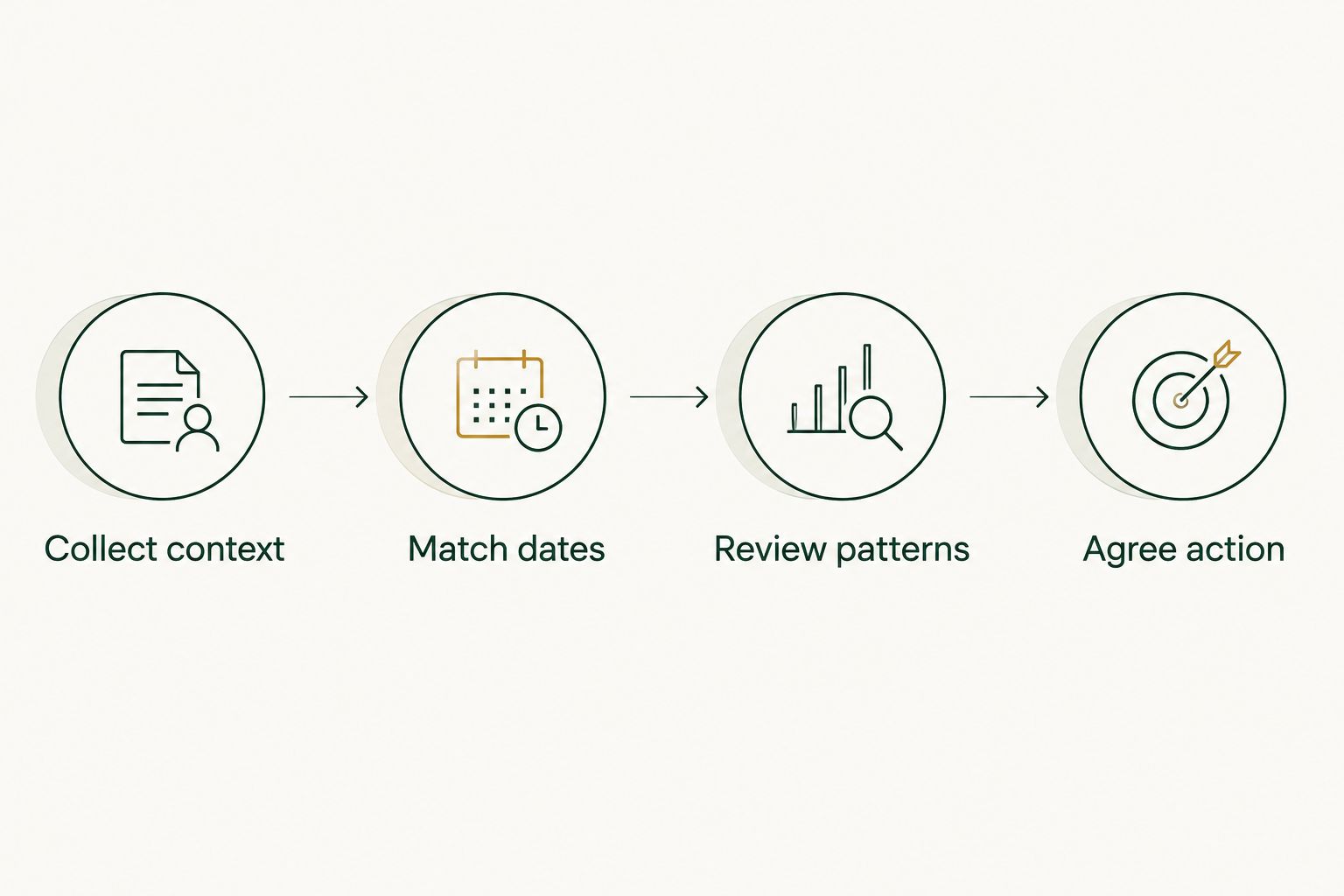
Matching dates comes before interpreting a pattern or changing the plan.
Repeat the review after a treatment update
A second useful workflow begins when your clinician changes treatment or agrees on a specific nutrition or activity adjustment. The connection stays the same; the comparison period changes.
- Mark the change date. Record exactly what changed and who directed it. Keep the prescribed medication details separate from your interpretation of its effects.
- Choose the comparison periods with your clinician. Select dates before and after the change that answer the clinical question. Avoid comparing an ordinary working week with an illness or travel period without acknowledging the difference.
- Keep the other records running. Continue meal, weight, symptom, and activity entries. If several things changed together, record them all rather than crediting one intervention automatically.
- Compare benefits and burdens. Review glucose patterns alongside appetite, gastrointestinal symptoms, hydration, food intake, and the weight trend. Report problems promptly instead of waiting for the scheduled review.
- Confirm the next decision. Ask whether the change should continue and when to reassess. A single favorable day is not a reason to escalate medication.
Expected result: you have a dated before-and-after record with the limitations visible. The workflow supports a clinician's assessment; it does not establish that the treatment caused every change.
This is especially important during GLP-1 treatment. Reduced appetite does not remove the need for adequate nutrition, physical activity, or attention to muscle preservation. Glucose is one outcome, not the entire plan.
Troubleshooting
Glucose appears on the device but not in Clarity
Check that you are using the correct account and supported reporting route for your device. Confirm internet access and follow the manufacturer's upload instructions, particularly for receiver-based use. Contact Dexcom support if the record remains absent; do not repeatedly create new accounts and split your history.
Meal times do not line up with glucose patterns
Compare time zones and the original entry times before changing your interpretation. Note late diary entries, travel, and clock changes. Remember that CGM measures glucose in interstitial fluid, so its curve does not have to match a blood glucose measurement or the moment you take a bite exactly.
An unexpected low does not match how you feel
Pressure on a sensor during sleep can produce an apparent low. But do not assume that every unexpected low is a sensor artifact. Follow your device instructions and personal diabetes safety plan; when readings do not match symptoms or expectations, use a blood glucose meter as directed before treatment decisions. Seek urgent help for severe symptoms.
Glucose improves but weight does not
A glucose curve is not a calorie meter or a fat-loss measurement. Review the longer weight trend, food intake, medication history, symptoms, and fluid changes with your clinician. Do not respond by eliminating more foods solely because they produce a visible rise.
The clinic cannot open your report
Confirm the accepted file format and secure destination. Send a readable report rather than a password-protected account login or an unsupported raw-data file. If clinic sharing was requested, ask the team to confirm receipt; successful submission on your phone is not proof of successful clinical access.
Customize your workflow
Add the laboratory context CGM cannot provide
GoodLife Health Cardiometabolic Optimization includes a Biomarker Audit every 90 days, or 4 audits per year. The included assessment covers ApoB, Lp(a), hs-CRP, HbA1c, lipids, insulin markers, and full hormone and thyroid panels. Laboratory testing runs through the Beluga Health lab network.
CGM cannot replace those measurements. It does not measure atherogenic particle burden, thyroid hormones, or systemic inflammation. HbA1c reflects longer-term glucose exposure, generally over approximately 2–3 months, while CGM shows patterns within the recorded sensor period.
The advantage is a broader clinical assessment. The limitation is equally important: neither a panel nor a sensor interprets itself, and a scheduled quarterly audit does not replace earlier assessment when symptoms or treatment require it. Additional testing beyond the quarterly cadence is handled separately.
Keep the clinical relationship explicit
Clinical care is delivered by licensed physicians of Beluga Health, P.A., an independent Florida professional corporation licensed to practice in all 50 states, working under GoodLife Health's clinical protocols. Do not assume that connecting a device changes who is responsible for prescriptions or urgent concerns.
If medication is appropriate, the clinician evaluates the indication, contraindications, tolerability, and monitoring needs. A glucose rise after lunch is not, by itself, a reason to start or increase a GLP-1 medication.
For the care framework, read about direct primary care for weight loss management.
Reduce the work before adding automation
For your 2026 workflow, automate reminders before automating data transfer. A recurring reminder to complete your diary or prepare a report creates less uncertainty than an unverified connection passing sensitive health data between services.
Before authorizing any third-party integration, check the exact supported sensor, data types, permissions, transfer delay, and deletion controls. Test it against a known date range. A service importing weight does not necessarily import glucose, and a glucose import does not establish clinician review.
Keep only information that changes a decision. If CGM monitoring increases anxiety, compulsive checking, or food avoidance, discuss whether a simpler monitoring plan would serve you better.
FAQ
How do I connect Dexcom CGM to my weight loss plan?
Use Dexcom Clarity for supported glucose reporting, keep dated meal and weight records, and send matching periods through your clinical team's approved route. This report-based workflow does not require a direct connection to a weight loss app.
Does Dexcom automatically sync with GoodLife Health?
A native Dexcom-to-GoodLife Health integration is not established by this guide. Ask the clinical team which reports and secure sharing methods it accepts before authorizing access.
Do I need a CGM to lose weight?
No, CGM is not required for everyone pursuing weight loss. Your clinician can assess whether sensor data would answer a useful question beyond your history, weight trend, symptoms, and laboratory results.
Does a flat glucose graph mean I am burning fat?
No, a flat glucose graph does not establish fat burning or weight loss. CGM measures interstitial glucose, not calorie balance, body fat, or muscle preservation.
Can I use Dexcom readings to change my GLP-1 dose?
Do not change your GLP-1 dose independently based on Dexcom readings. Your prescribing clinician must assess the indication, treatment response, adverse effects, and other medications before changing the prescription.
What should I do if Dexcom shows a low but I feel normal?
Follow your device instructions and personal safety plan rather than assuming the reading is false. When readings do not match symptoms or expectations, use a blood glucose meter as directed before treatment decisions; seek urgent help for severe symptoms.
Can CGM replace HbA1c and other metabolic blood tests?
No, CGM cannot replace HbA1c or laboratory assessment of lipids, hormones, thyroid function, and inflammation. Sensor readings and laboratory testing answer different clinical questions.
Should my clinician monitor my Dexcom readings all day?
Do not assume continuous clinical monitoring unless your care team explicitly agrees to provide it. Confirm report-review timing, alert responsibilities, and the route for urgent concerns before relying on shared data.
One last thing
Decide what question the sensor must answer before you collect more data. A useful question might concern recurring symptoms, a meal pattern, or the response to a clinician-directed treatment change. Without that question, additional readings create more opportunities to react without improving the plan.
References
- Tirzepatide Once Weekly for the Treatment of Obesity (SURMOUNT-1). 2022. pubmed.ncbi.nlm.nih.gov/35658024/
- Once-Weekly Semaglutide in Adults with Overweight or Obesity (STEP 1). 2021. pubmed.ncbi.nlm.nih.gov/33567185/